

Complete ICT UGC NET Paper 1 revision guide covering Unit 8 syllabus, abbreviations, digital initiatives like SWAYAM, e-governance models, and previous year question patterns.
If you’re preparing for the UGC NET exam, Unit 8 on Information and Communication Technology (ICT) represents one of the most scoring sections in Paper 1. Unlike units that require deep conceptual understanding or lengthy memorization, ICT rewards candidates who focus on factual recall, abbreviations, and familiarity with India’s digital education initiatives. This quick revision guide is designed specifically for aspirants who need to consolidate their ICT preparation in a time-efficient manner.
The ICT section typically contributes 5-6 questions in every UGC NET Paper 1 exam, translating to 10-12 marks. In recent UGC NET Paper 1 cycles, ICT featured a notably higher number of questions (typically 6–8 per shift). For many candidates, especially those from law, commerce, and humanities backgrounds, this unit can feel intimidating due to its technical nature. However, the truth is that most questions follow predictable patterns and test recognition rather than problem-solving. With the right revision strategy, you can secure full marks in this section without spending disproportionate time on it.
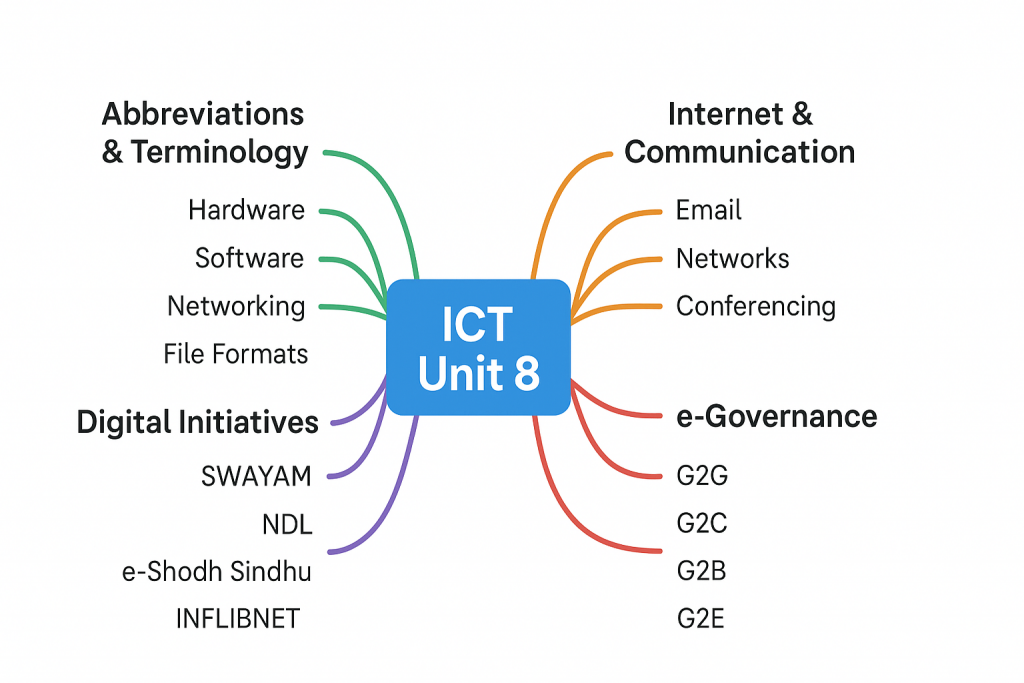
This guide covers all four sub-topics of the official syllabus: general abbreviations and terminology, basics of internet and communication technologies, digital initiatives in higher education, and ICT in governance. Each section is structured for rapid revision, with high-frequency terms, exam-relevant facts, and previous year question patterns that will help you walk into your exam with confidence.

UGC NET Paper 1 ICT Syllabus and Exam Pattern
Understanding the exact syllabus structure and question distribution is essential before diving into content revision. The ICT unit is designated as Unit 8 in the UGC NET Paper 1 syllabus and carries significant weightage relative to the effort required to master it. This section breaks down what you need to cover and how questions appear in the actual exam.
The Four Key Sub-Topics You Must Cover
The official UGC NET syllabus divides Unit 8 into four distinct sub-topics, and questions appear from all of them in varying proportions. The first sub-topic covers ICT general abbreviations and terminology, which forms the foundation for all ICT questions. You’ll encounter terms like CPU, RAM, ROM, HTTP, FTP, and dozens of others that you must recognize instantly. This sub-topic alone can contribute 1-2 questions per exam.
The second sub-topic addresses the basics of Internet, Intranet, Email, Audio and Video-conferencing. Here, you need to understand network types (LAN, MAN, WAN), how email protocols work, and the difference between synchronous and asynchronous communication. Questions from this area test your conceptual clarity about how digital communication systems function.
The third sub-topic, Digital Initiatives in Higher Education, is the highest-scoring area within ICT. Initiatives like SWAYAM, SWAYAM Prabha, National Digital Library, e-Shodh Sindhu, and INFLIBNET appear repeatedly in exams. Based on previous year analysis, this sub-topic alone contributes 2-3 questions per exam, making it the most important area to master.
The fourth sub-topic covers ICT and Governance, focusing on e-Governance models and Digital India initiatives. You’ll encounter questions about G2G, G2C, G2B, G2E interactions, DigiLocker, GeM portal, and other government platforms. This area has gained increased importance in recent exam cycles.
Question Distribution Pattern from Previous Years
Analysis of UGC NET Paper 1 question papers from 2019 to 2024 reveals consistent patterns in ICT question distribution. Digital Initiatives in Higher Education dominates with approximately 40-45% of all ICT questions, making it the single most important sub-topic. Questions on SWAYAM, its four quadrants, seven national coordinators, and related platforms appear in almost every exam cycle.
The remaining questions are distributed fairly evenly among the other three sub-topics. Abbreviation-based questions contribute 20-25%, with terms like HTML, URL, ISP, and network protocols appearing frequently. Internet and communication basics account for 15-20%, while e-Governance questions make up the remaining 15-20%. This distribution should guide your revision time allocation accordingly.
Types of Questions Asked
ICT questions in UGC NET Paper 1 are primarily asked in three formats: direct factual questions, matching type questions, and statement-based questions. Direct factual questions ask you to identify what a specific abbreviation stands for or which organization launched a particular initiative. For example, “SWAYAM stands for” or “Which platform provides 40 DTH educational channels?” These require straightforward recall.
Matching type questions present two columns and ask you to pair items correctly. A typical question might list digital initiatives in one column (SWAYAM, NAD, NDL, e-PG Pathshala) and their purposes in another (MOOCs platform, academic depository, digital library, postgraduate resources). Statement-based questions are increasingly common, presenting two statements and asking you to evaluate their correctness. For instance, “Statement I: NPTEL is coordinated by IIT Madras. Statement II: SWAYAM courses are always free including certification.”
Scoring Potential and Time Investment
The ICT section offers one of the best return-on-investment ratios in Paper 1. With 5-6 questions worth approximately 10-12 marks, you can realistically score full marks with just 15-20 hours of focused preparation. This compares favorably to units like Research Aptitude or Logical Reasoning, which require significantly more time for similar mark potential.
The key to maximizing your score is strategic revision rather than exhaustive study. Focus on memorizing abbreviations that appear frequently in the examination, understanding the key facts about major digital initiatives, and practicing previous year questions. Most candidates who dedicate even moderate effort to ICT report it as their strongest section in Paper 1.
ICT Abbreviations and Terminology For UGC NET Paper 1
Abbreviations form the bedrock of ICT questions in UGC NET Paper 1. You cannot afford to skip this section because 1-2 questions will directly test your knowledge of what specific terms stand for. This section organizes the most exam-relevant abbreviations into logical categories for efficient memorization.
Hardware and Software Abbreviations
Hardware and software terms appear frequently in UGC NET Paper 1, and understanding these abbreviations is fundamental to answering ICT questions correctly. These terms describe the physical and logical components of computer systems that you interact with daily.
Computer Components (CPU, RAM, ROM, ALU, CU)
The Central Processing Unit (CPU) is often called the brain of the computer because it executes all instructions and processes data. Within the CPU, the Arithmetic and Logical Unit (ALU) handles all mathematical calculations and logical comparisons, while the Control Unit (CU) manages the flow of data between different components. These three terms frequently appear together in questions asking about computer architecture.
Memory-related abbreviations are equally important for exam success. RAM stands for Random Access Memory, which is volatile memory that stores data temporarily while programs run. ROM stands for Read Only Memory, which is non-volatile and contains permanent instructions like the BIOS (Basic Input Output System). Questions often test whether you can distinguish between volatile and non-volatile memory types.
Storage and Memory Terms (HDD, SSD, USB, DVD, CD-ROM)
Storage device abbreviations describe how data is permanently saved on computer systems. HDD stands for Hard Disk Drive, which uses magnetic storage and spinning platters to store data. SSD stands for Solid State Drive, which uses flash memory and has no moving parts, making it faster and more durable than traditional HDDs.
Portable storage terms include USB (Universal Serial Bus), which is both a connection standard and refers to portable flash drives. DVD stands for Digital Versatile Disc, while CD-ROM stands for Compact Disc Read Only Memory. These optical storage formats store data using laser technology. Understanding the distinction between different storage types helps answer questions about data storage capabilities and characteristics.
Software Categories (OS, BIOS, GUI, API)
Software abbreviations describe the programs and interfaces that make computers functional. OS stands for Operating System, which is the fundamental software that manages hardware resources and provides services for applications. Common examples include Windows, Linux, and macOS. BIOS stands for Basic Input Output System, which is firmware that initializes hardware during the startup process.
GUI stands for Graphical User Interface, which allows users to interact with computers through visual elements like icons and windows rather than text commands. API stands for Application Programming Interface, which enables different software programs to communicate with each other. These terms appear in questions about software types and computer functionality.
Networking and Internet Abbreviations
Networking abbreviations describe how computers connect and communicate with each other. This category is crucial for UGC NET because questions about network types and protocols appear consistently across exam cycles.
Network Types (LAN, MAN, WAN, PAN, VPN)
LAN stands for Local Area Network, which connects computers within a limited geographical area such as a home, office, or school building. MAN stands for Metropolitan Area Network, which covers a larger area like a city or town and connects multiple LANs. WAN stands for Wide Area Network, which spans vast geographical areas, potentially connecting computers across countries. The Internet itself is the largest example of a WAN.
PAN stands for Personal Area Network, which connects devices within the range of an individual person, typically within 10 meters. Bluetooth connections exemplify PANs. VPN stands for Virtual Private Network, which creates a secure, encrypted connection over a public network like the Internet. Understanding these network types and their scope is essential for answering comparison-based questions.
Protocols and Standards (HTTP, HTTPS, FTP, SMTP, TCP/IP)
HTTP stands for HyperText Transfer Protocol, which is the foundation of data communication on the World Wide Web. HTTPS adds Security to HTTP through encryption, protecting data during transmission. These protocols govern how web browsers communicate with web servers. Questions often test whether you understand the difference between HTTP and HTTPS.
FTP stands for File Transfer Protocol, which is used to transfer files between computers over a network. SMTP stands for Simple Mail Transfer Protocol, which handles sending emails. TCP/IP stands for Transmission Control Protocol/Internet Protocol, which is the fundamental communication protocol suite that enables the Internet to function. Understanding these protocols helps answer questions about how data moves across networks.
Web Technologies (URL, HTML, WWW, ISP, DNS)
URL stands for Uniform Resource Locator, which is the address used to locate resources on the Internet. HTML stands for HyperText Markup Language, which is the standard language for creating web pages. WWW stands for World Wide Web, which is the system of interlinked hypertext documents accessed via the Internet. These terms describe how web content is addressed, created, and accessed.
ISP stands for Internet Service Provider, which is a company that provides Internet access to customers. DNS stands for Domain Name System, which translates human-readable domain names like google.com into IP addresses that computers use. These infrastructure terms explain how users connect to and navigate the Internet.
Communication and File Format Terms
Understanding file formats and communication protocols helps you answer questions about digital content types and email systems. These abbreviations appear in questions about multimedia and electronic communication.
Audio and Video Formats (MP3, MP4, AVI, JPEG, PNG, PDF)
MP3 stands for MPEG Audio Layer 3, which is a popular compressed audio format that revolutionized digital music distribution. MP4 is a multimedia container format that can store video, audio, and subtitles. AVI stands for Audio Video Interleave, which is a multimedia container format developed by Microsoft. These formats are tested to check if you understand digital media standards.
Image formats include JPEG (Joint Photographic Experts Group), which uses lossy compression and is ideal for photographs. PNG stands for Portable Network Graphics, which supports lossless compression and transparency. PDF stands for Portable Document Format, which preserves document formatting across different systems. Questions may ask you to match file extensions with their full forms or purposes.
Email and Messaging Terms (POP, IMAP, CC, BCC)
Email protocols determine how messages are retrieved from mail servers. POP stands for Post Office Protocol, which downloads emails to your device and typically removes them from the server. IMAP stands for Internet Message Access Protocol, which keeps emails on the server and synchronizes across multiple devices. Understanding the difference between POP and IMAP is important for answering email-related questions.
CC stands for Carbon Copy, which allows you to send copies of an email to additional recipients whose addresses are visible to all. BCC stands for Blind Carbon Copy, where recipients cannot see who else received the email. These terms appear in questions about email structure and functionality, and understanding them helps with practical knowledge of digital communication.
Quick Recall Techniques for Abbreviations
Memorizing dozens of abbreviations can feel overwhelming, but certain techniques can make this task manageable. The key is to create meaningful associations and group related terms together for efficient recall during the exam.
Memory Tricks for High-Frequency Terms
Creating mnemonics and visual associations helps cement abbreviations in your memory. For network types, remember “LAN MAN WAN” in order of increasing geographical scope, with LAN being the smallest (your local area) and WAN being the widest. For email protocols, remember that POP “pops” emails off the server (downloads and removes), while IMAP “maps” emails across devices (keeps them synchronized).
Abbreviation Groups That Appear Together in Exams
Certain abbreviations frequently appear together in UGC NET questions, so learning them as clusters improves efficiency. The memory hierarchy group includes RAM, ROM, PROM, EPROM, and EEPROM. The network group includes LAN, MAN, WAN, PAN, and VPN. The web protocol group includes HTTP, HTTPS, FTP, SMTP, and TCP/IP. Practicing these clusters through flashcards or rapid recall exercises strengthens your exam readiness.
Internet, Intranet, and Communication Technologies
This section covers the second sub-topic of the ICT syllabus, which tests your understanding of how digital networks and communication systems work. Questions from this area require conceptual clarity rather than pure memorization, so understanding the underlying principles is essential.
Internet Fundamentals for UGC NET Paper 1
The Internet is a worldwide telecommunications system that provides connectivity for millions of smaller networks, which is why it is often referred to as a network of networks. Understanding its basic architecture and services helps answer both direct and application-based questions in UGC NET.
What is the Internet and How Does It Work?
The Internet is a global system of interconnected computer networks that use standardized communication protocols (TCP/IP) to link devices worldwide. Unlike a private network, the Internet is publicly accessible and enables users to access information, communicate, and share resources regardless of their physical location. This decentralized architecture makes it resilient and scalable.
Data on the Internet travels through a process called packet switching, where information is broken into small packets that travel independently across networks and reassemble at the destination. This is more efficient than circuit switching (used in traditional telephone networks) because it allows multiple communications to share the same network infrastructure simultaneously.
Key Internet Services (WWW, Email, FTP, VoIP)
The World Wide Web (WWW) is the most widely used Internet service, consisting of interlinked hypertext documents accessed through web browsers. While people often use “Internet” and “WWW” interchangeably, they are technically different: the Internet is the infrastructure, while the WWW is a service that runs on it. Email (Electronic Mail) allows users to send and receive messages electronically, using protocols like SMTP for sending and POP3/IMAP for receiving.
FTP (File Transfer Protocol) enables the transfer of files between computers on a network, commonly used for uploading website files to servers. VoIP (Voice over Internet Protocol) allows voice communication and multimedia sessions over the Internet, powering services like Skype and WhatsApp calls. Understanding these services helps answer questions about Internet applications and their underlying technologies.
Intranet vs Extranet: Understanding the Differences
While the Internet is publicly accessible, organizations often need private networks for secure internal communication. This is where Intranets and Extranets come into play, and questions about their differences appear regularly in UGC NET exams.
Organizational Networks and Their Applications
An Intranet is a private network accessible only within an organization, using Internet protocols and technologies. It serves as an internal communication and collaboration platform where employees can share documents, access company resources, and communicate securely. Universities, corporations, and government agencies all use Intranets to manage their internal operations efficiently.
An Extranet extends the Intranet to include authorized external users such as partners, suppliers, or clients. For example, a university might provide Extranet access to affiliated colleges or research collaborators. The key difference is that Intranets are purely internal, while Extranets allow controlled external access while still maintaining security boundaries.
Security and Access Control Concepts
Both Intranets and Extranets require robust security measures because they contain sensitive organizational data. Firewalls act as barriers between the internal network and the external Internet, monitoring and controlling incoming and outgoing traffic based on predetermined security rules. Access control mechanisms ensure that only authorized users can access specific resources.
Authentication methods like passwords, two-factor authentication, and digital certificates verify user identity before granting access. Encryption protects data during transmission, making it unreadable to unauthorized parties. These security concepts are important not only for this section but also for the e-Governance portion of the ICT syllabus.
Email Basics and Components
Email remains one of the most widely used digital communication tools, and UGC NET tests your understanding of its structure and protocols. This knowledge is practical and directly applicable to everyday digital literacy.
Email Structure (Header, Body, Attachment)
An email consists of several distinct components that serve specific functions. The email header contains metadata including the sender’s address (From), recipient’s address (To), date and time of sending (Date), and a brief description of the content (Subject). The header also includes CC (Carbon Copy) for additional recipients and BCC (Blind Carbon Copy) for recipients who should remain hidden from others.
The email body contains the actual message content that the sender wishes to communicate. It can include plain text or formatted text (HTML emails) with images, links, and styling. Attachments are files sent along with the email, which can include documents, images, or other digital content. Understanding these components helps answer questions about email structure and terminology.
Email Protocols (SMTP, POP3, IMAP)
SMTP (Simple Mail Transfer Protocol) is used for sending emails from a client to a server or between servers. When you compose and send an email, SMTP handles the outgoing transmission. It operates on port 25 by default and works in a “push” mechanism, pushing mail from sender to recipient’s mail server.
POP3 (Post Office Protocol version 3) and IMAP (Internet Message Access Protocol) handle incoming mail retrieval. POP3 downloads emails to your local device and typically removes them from the server, making them accessible offline but only on one device. IMAP keeps emails on the server and synchronizes them across multiple devices, which is why it’s preferred for users who access email from phones, tablets, and computers.
Audio and Video Conferencing
Video conferencing has become increasingly important in education and professional contexts, and UGC NET includes questions about communication technologies and their applications. Understanding synchronous versus asynchronous communication is particularly relevant.
Video Conferencing Technologies and Platforms
Video conferencing enables real-time audio and visual communication between participants at different locations using telecommunication technology. It is also called video teleconference and is more effective than audio-only calls because it allows participants to see facial expressions and body language. Modern platforms compress and transmit video and audio data simultaneously over the Internet.
Popular video conferencing platforms include Zoom, Google Meet, Microsoft Teams, Skype, and Cisco Webex. In the educational context, platforms like BigBlueButton are used for online classes. These platforms offer features like screen sharing, chat functions, recording capabilities, and breakout rooms for group discussions. Understanding these technologies is relevant for questions about digital learning environments.
Synchronous vs Asynchronous Communication
Synchronous communication occurs in real-time, where all participants must be present simultaneously. Video conferencing, phone calls, and live chat are examples of synchronous communication. This mode is ideal for discussions requiring immediate feedback, collaborative problem-solving, and building personal connections.
Asynchronous communication does not require simultaneous participation, allowing people to engage at their convenience. Email, discussion forums, and recorded video lectures are examples. MOOCs (Massive Open Online Courses) like SWAYAM primarily use asynchronous delivery through recorded video lectures, though they may include synchronous elements like live webinars. Understanding this distinction is important for questions about online learning methodologies.
Digital Initiatives in Higher Education: UGC NET Paper 1 ICT Guide
This section covers a crucial topic of the ICT syllabus. Every exam cycle includes questions about SWAYAM, its components, and related platforms.
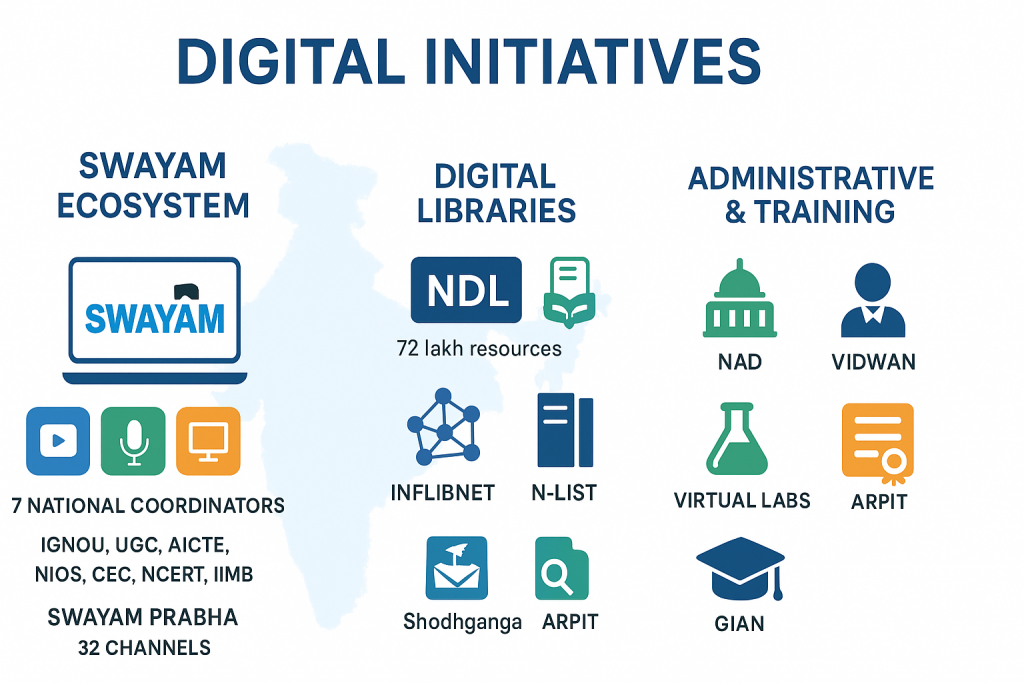
SWAYAM and MOOCs Ecosystem
SWAYAM is the flagship digital initiative for online education in India and appears in virtually every UGC NET Paper 1 exam. Understanding its structure, components, and coordinators is non-negotiable for any serious aspirant.
What is SWAYAM and Its Four Quadrants
SWAYAM stands for Study Webs of Active-Learning for Young Aspiring Minds. It is India’s indigenous MOOCs (Massive Open Online Courses) platform developed by the Ministry of Human Resource Development (now Ministry of Education) and AICTE with technical assistance from Microsoft. SWAYAM provides free access to quality education from Class 9 through postgraduate levels, addressing the three cardinal principles of Education Policy: access, equity, and quality.
The SWAYAM pedagogy is built around four quadrants that ensure comprehensive learning. The first quadrant consists of video tutorials covering entire courses, typically around 20 hours of instruction with individual lectures not exceeding 30 minutes. The second quadrant provides e-content in the form of downloadable and printable reading materials. The third quadrant offers self-assessment through quizzes and assignments that intersperse the course. The fourth quadrant is a discussion forum where learners can post queries and interact with instructors.
Seven National Coordinators (NPTEL, UGC, CEC, NCERT, NIOS, IGNOU, IIMB)
SWAYAM courses are coordinated by seven national bodies, each responsible for specific educational levels. NPTEL (National Programme on Technology Enhanced Learning) coordinates engineering courses and is managed by IIT Madras. UGC (University Grants Commission) coordinates postgraduate non-engineering courses, while CEC (Consortium for Educational Communication) handles undergraduate non-engineering courses.
NCERT (National Council of Educational Research and Training) coordinates courses for school students from Classes 9 to 12. NIOS (National Institute of Open Schooling) handles out-of-school students at the school level. IGNOU (Indira Gandhi National Open University) coordinates courses for out-of-college learners. IIM Bangalore coordinates management courses. Additionally, NITTTR (National Institute of Technical Teachers Training and Research) Chennai coordinates teacher training programs. Memorizing these seven coordinators and their respective domains is essential because matching questions frequently test this knowledge.
Credit Transfer and Certification Process
SWAYAM courses are available free of cost for learning purposes, but certification requires registration for proctored examinations at designated centers and payment of a nominal fee. This certification process ensures the credibility of SWAYAM qualifications. The UGC has issued regulations allowing universities to recognize SWAYAM courses for academic credit.
Under the UGC (Credit Framework for Online Learning Courses through SWAYAM) Regulation, 2016, universities can transfer up to 20% of total course credits from SWAYAM completions. This integration of online learning into formal education represents a significant step toward democratizing quality education. Questions about SWAYAM’s credit transfer policy and free versus paid aspects appear regularly in exams.
SWAYAM Prabha and DTH Channels
SWAYAM Prabha complements the online SWAYAM platform by providing television-based educational content for areas with limited Internet connectivity. This initiative demonstrates India’s multi-modal approach to digital education delivery.
Educational Channels and Their Purpose
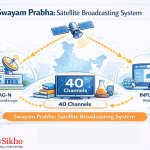
SWAYAM Prabha consists of 40 DTH (Direct to Home) television channels that broadcast high-quality educational content 24 hours a day, 7 days a week using the GSAT-15 satellite. New content is broadcast for at least 4 hours daily and repeated 5 more times throughout the day, allowing students to watch at their convenience. The channels are uplinked from BISAG (Bhaskaracharya Institute for Space Applications and Geo-informatics) in Gandhinagar.
Key channels include those dedicated to curriculum-based content covering arts, science, commerce, engineering, law, medicine, and agriculture. The IIT-PAL (IIT Professor Assisted Learning) channels specifically target Class 11 and 12 students preparing for IIT-JEE, covering Mathematics, Physics, Chemistry, and Biology. Other prominent channels include CEC-UGC channels for undergraduate content, IGNOU channels for distance learning, and NCERT channels for school education.
Content Coverage and Target Audience
The content on SWAYAM Prabha channels is provided by premier institutions including NPTEL, IITs, UGC, CEC, IGNOU, NCERT, and NIOS. The INFLIBNET Centre maintains the web portal for SWAYAM Prabha. This initiative primarily targets students in remote areas where Internet connectivity is limited or unreliable, ensuring that geographical barriers do not prevent access to quality education.
The channels cover certification-ready courses across diverse disciplines, school education modules for Classes 9-12, teacher training content, and lifelong learning resources for Indian citizens both in India and abroad. This comprehensive coverage makes SWAYAM Prabha a critical component of India’s digital education infrastructure.
Digital Libraries and Research Platforms
India has developed several digital libraries and research platforms to provide free access to academic resources. These platforms frequently appear in UGC NET questions, particularly in matching-type questions about their purposes and features.
National Digital Library of India (NDL)
The National Digital Library of India (NDL India) is a pilot project under NMEICT (National Mission on Education through ICT) to develop a framework of virtual repository of learning resources with a single-window search facility. Developed by IIT Kharagpur, NDL provides access to over 125 million digital books and resources covering all major domains of education from school level to postgraduate and research levels.
e-Shodh Sindhu and Research Access
e-Shodh Sindhu was formed by merging three previous consortia: UGC-INFONET Digital Library Consortium, NLIST (National Library and Information Services Infrastructure for Scholarly Content), and INDEST-AICTE Consortium. This unified platform provides access to more than 15,000 international electronic journals and e-books to higher educational institutions across India.
The merger streamlined access to scholarly resources and eliminated duplication of efforts across different consortia. Researchers at eligible institutions can access premium journals from publishers like Elsevier, Springer, Wiley, and others through e-Shodh Sindhu. This initiative significantly enhances research capabilities by providing access to resources that would otherwise be prohibitively expensive for individual institutions.
INFLIBNET and N-LIST Services
INFLIBNET stands for Information and Library Network Centre and is an autonomous inter-university centre of UGC. It coordinates and implements various library automation and networking activities in higher education institutions. INFLIBNET manages several important digital initiatives including the SWAYAM Prabha web portal, Shodhganga (thesis repository), and the e-Shodh Sindhu consortium.
N-LIST (National Library and Information Services Infrastructure for Scholarly Content) provides access to e-resources to students and faculty of colleges affiliated to universities. Through N-LIST, colleges can access over 6,500 e-journals and 1.99 + lakhs e-books from various publishers. This initiative bridges the digital divide between universities and affiliated colleges.
Shodh Gangotri and Research Repository
Shodh Gangotri is a repository of Indian research in progress hosted by INFLIBNET. It stores synopses of research scholars registered for PhD programs in Indian universities. This repository helps prevent duplication of research efforts and provides visibility to ongoing research projects. It complements Shodhganga, which stores completed PhD theses.
Shodhganga (meaning “River of Research”) is a digital repository of Indian electronic theses and dissertations. It provides open access to full-text theses submitted to Indian universities, making research output available to scholars worldwide. Understanding the difference between Shodh Gangotri (research in progress) and Shodhganga (completed research) helps answer comparative questions.
Academic and Administrative Platforms
Beyond content delivery and research access, several platforms support academic administration and specialized learning. These platforms appear in questions about specific educational services and their functions.
National Academic Depository (NAD)
National Academic Depository (NAD) is an online storehouse of academic awards (degrees, diplomas, certificates, mark sheets) in digital format. It facilitates digital issuance, storage, access, and verification of academic credentials by students, academic institutions, and employers. NAD is part of the Digital India initiative and aims to eliminate difficulties associated with physical paper certificates.
e-PG Pathshala for Postgraduate Education
e-PG Pathshala is an initiative providing high-quality, curriculum-based, interactive e-content in 70 subjects across arts, fine arts, humanities, social sciences, and languages at the postgraduate level. Developed under NMEICT, it contains over 23,000 e-content modules including text, audio, video, and self-assessment materials. It specifically targets postgraduate education quality enhancement.
VIDWAN Expert Database
VIDWAN is the premier database of profiles of scientists, researchers, and faculty members working in leading academic and R&D organizations in India. Maintained by INFLIBNET with support from NMEICT, it facilitates identification of peer reviewers, potential collaborators, and experts for policy consultations. VIDWAN helps establish networking opportunities among the scientific community.
Virtual Labs and e-Yantra
Virtual Labs is an initiative under NMEICT that provides remote access to laboratory experiments. With over 205 virtual labs in 9 Engineering and Science disciplines comprising about 1,515 experiments, it allows students to perform experiments remotely using just a computer with Internet connectivity. This is particularly valuable for institutions lacking physical laboratory infrastructure.
e-Yantra is an MHRD initiative implemented by IIT Bombay to incorporate robotics into engineering education. It engages students through hands-on application of mathematics, computer science, and engineering principles through robotic platforms. Currently implemented in 100+ colleges, e-Yantra creates practical skills through project-based learning.
Teacher Training and Development Initiatives
Recognizing that quality education depends on well-trained teachers, India has launched several initiatives focused on faculty development. These platforms appear in questions about teacher training and professional development.
ARPIT (Annual Refresher Programme in Teaching)
ARPIT is an online professional development program using the SWAYAM platform for higher education faculty. It offers refresher courses of 40 hours duration across disciplines, enabling teachers to earn credits for career advancement. ARPIT addresses the massive faculty development needs of Indian higher education institutions through scalable online delivery.
GIAN Programme for Global Faculty
GIAN (Global Initiative of Academic Networks) aims to tap the talent pool of scientists and entrepreneurs internationally to encourage their engagement with Indian higher education institutions. It brings global faculty to Indian institutions for short-term courses, facilitating knowledge exchange and exposure to international academic practices.
DIKSHA Platform for Teachers
DIKSHA (Digital Infrastructure for Knowledge Sharing) is a national platform for school education that provides teachers, students, and parents with curriculum-linked learning resources. While primarily focused on school education, it represents the broader digital education ecosystem and appears in questions comparing different educational platforms and their target audiences.
UGC NET Paper 1 ICT and Governance: e-Governance Models and Applications
E-Governance represents the intersection of ICT and public administration, and this sub-topic carries increasing importance in UGC NET Paper 1. Questions focus on the four pillars of e-Governance and major government digital initiatives under the Digital India programme.
Understanding e-Governance Framework
E-Governance uses ICT to deliver government services, facilitate information exchange, and transform the relationship between government and citizens. Understanding its fundamental framework is essential for answering UGC NET questions on this topic.
What is e-Governance and what are its four pillars: G2G, G2C, G2B, G2E
E-Governance is the application of Information and Communication Technology for delivering government services, exchanging information, and enabling communication and transactions between government and citizens, businesses, and other government entities. The “e” stands for “electronic,” emphasizing the digital delivery of governance functions. The primary objectives are to increase transparency, accountability, efficiency, and citizen convenience while reducing corruption.
E-Governance operates through four interaction models based on who is interacting with whom. G2G (Government to Government) involves ICT-enabled interactions between different government departments and agencies. This includes digital file routing, office order management, and inter-departmental communication. The e-Office project of the central government exemplifies G2G interaction.
G2C (Government to Citizen) focuses on providing ICT services directly to citizens efficiently and economically. Examples include Common Service Centres (CSC), Passport Seva Kendra, and various online certificate services. G2B (Government to Business) covers digital interactions between government and business entities, including e-procurement, GST portal, and company registration through MCA21. G2E (Government to Employee) addresses internal government operations and employee services, including payroll management, employee provident fund systems, and HR management.
Government to Citizen (G2C) Initiatives
G2C initiatives directly impact citizens’ daily lives by simplifying access to government services. These platforms frequently appear in UGC NET questions about digital governance.
DigiLocker and Digital Document Storage
DigiLocker is a flagship initiative under Digital India that provides citizens a dedicated cloud storage space for storing and accessing their documents and certificates digitally. It eliminates the need for physical documents by enabling paperless verification through authentic digital documents issued directly by government agencies. Over 5 billion documents have been made available through DigiLocker.
Passport Seva Kendra
Passport Seva Kendra is part of the Passport Seva Project that transformed passport issuance into a citizen-friendly, online service delivery system. Citizens can apply online, schedule appointments, and track application status digitally. The system significantly reduced processing time and eliminated the need for multiple visits to passport offices.
PAN (NSDL and UTI Services)
PAN (Permanent Account Number) application and services are delivered through authorized agencies NSDL (National Securities Depository Limited) and UTI Infrastructure Technology and Services Limited. Citizens can apply for new PAN cards, make corrections, and verify PAN details online. This digital service streamlined tax administration and reduced paperwork.
Government to Government (G2G) Systems
G2G systems improve internal government efficiency through digital workflow management and data sharing between departments.
e-Office and File Management
e-Office is a Mission Mode Project under Digital India that aims to transform government offices into paperless offices. It provides features for electronic file management, digital signatures, leave management, and knowledge management. The system enables efficient file routing, quick search and retrieval, and maintains complete audit trails of file movement across departments.
Data.gov.in and Open Government Data
Data.gov.in is India’s Open Government Data platform that provides access to datasets generated by various government ministries and departments. It promotes transparency by making government data available to citizens, researchers, and businesses for analysis and application development. This platform supports the open data movement and enables data-driven governance.
Government to Business (G2B) Platforms
G2B platforms streamline business-government interactions, reducing compliance burden and improving ease of doing business.
e-Procurement and GeM Portal
GeM (Government e-Marketplace) is an online marketplace for government procurement of common-use goods and services. It provides transparency, efficiency, and fair competition in public procurement. GeM eliminates human interface and enables cashless, paperless, and contactless transactions for government purchases.
MCA21 and Business Registration
MCA21 is the e-Governance initiative of the Ministry of Corporate Affairs that enables electronic filing of statutory documents, company registration, and regulatory compliance. It provides anytime, anywhere electronic services related to company registration, director identification, and annual filings, significantly reducing processing time and paperwork.
GST
GST (Goods and Services Tax) portal is the digital platform for India’s unified indirect tax system. It enables registration, return filing, tax payment, and compliance management for businesses. The GST network processes millions of transactions daily, demonstrating the scale of digital transformation in taxation.
Government to Employee Initiatives
G2E initiatives address internal government operations and employee welfare through digital systems.
Pradhan Mantri Rojgar Protsahan Yojana
Pradhan Mantri Rojgar Protsahan Yojana is a scheme to incentivize employers to create new jobs by providing government contribution toward employee provident fund. The digital implementation enables seamless verification, processing, and disbursement of government contributions through the EPFO portal.
The EPF-EPS model- EPFO & provident funds
The Employees’ Provident Fund Organisation (EPFO) manages retirement benefits for organized sector employees through digital systems. The EPF (Employees’ Provident Fund) and EPS (Employees’ Pension Scheme) portals enable online member registration, contribution tracking, withdrawal processing, and pension disbursement, serving over 60 million members.
Digital India Mission and Its Components
Digital India is the umbrella programme that encompasses various e-Governance and digital empowerment initiatives. Understanding its nine pillars helps answer questions about India’s digital transformation vision.
Nine Pillars of Digital India
Digital India, launched in 2015, is built on nine pillars. The first three pillars focus on infrastructure: Broadband Highways (high-speed Internet connectivity), Universal Access to Mobile Connectivity, and Public Internet Access Programme (through CSCs and post offices). These ensure that digital services reach all citizens regardless of location.
The next three pillars address governance transformation: e-Governance (reforming government through technology), e-Kranti (electronic delivery of services), and Information for All (making government information accessible). These pillars aim to make governance more transparent, accountable, and citizen-centric.
The final three pillars focus on empowerment: Electronics Manufacturing (Make in India for IT), IT for Jobs (training youth for IT sector employment), and Early Harvest Programmes (quick-win projects). These pillars aim to create employment opportunities and build digital capabilities among citizens.
BharatNet and Rural Connectivity
BharatNet (formerly National Optical Fibre Network) is the world’s largest rural broadband connectivity project. It aims to connect all 2.5 lakh gram panchayats with optical fiber, providing affordable broadband services to rural India. This infrastructure enables the delivery of digital services to the last mile.
Aadhaar and Digital Identity
Aadhaar is a 12-digit unique identification number issued by UIDAI to Indian residents. It serves as a digital identity that enables authentication and eKYC (electronic Know Your Customer) for accessing various government services and subsidies. With over 1.3 billion enrollments, Aadhaar is the world’s largest biometric ID system.
Cybersecurity and Digital Safety Concepts
As digital adoption increases, cybersecurity has become an important topic in UGC NET. Questions about cyber threats and protection measures appear with increasing frequency, and the June 2025 exam included a question on malware.
Types of Cyber Threats (Malware, Phishing, Logic Bombs)
Malware (malicious software) is any software intentionally designed to cause damage to computers, servers, or networks. Types include viruses (programs that replicate by inserting copies into other programs), worms (self-replicating malware that spreads without user action), trojans (malware disguised as legitimate software), and ransomware (malware that encrypts data and demands payment). In the June 2025 UGC NET Paper 1 exam, a question appeared asking candidates to identify characteristics of malware, demonstrating the increasing emphasis on cybersecurity concepts.
Phishing is a social engineering attack that tricks users into revealing sensitive information by impersonating trustworthy entities through fake emails or websites. Logic bombs are malicious code that activates when specific conditions are met, such as a particular date or action. Understanding these threat types helps answer security-related questions.
Firewalls, Encryption, and Security Measures
Firewalls are security systems that monitor and control network traffic based on predetermined rules, acting as barriers between trusted internal networks and untrusted external networks. They can be hardware-based, software-based, or cloud-based, and are essential for protecting networks from unauthorized access and cyber attacks.
Encryption converts data into coded form that can only be read by authorized parties with the decryption key. Symmetric encryption uses the same key for encryption and decryption, while asymmetric encryption uses public-private key pairs. HTTPS uses encryption to secure web communications. Other security measures include antivirus software, multi-factor authentication, and regular security updates.
UGC NET Paper 1 ICT: Previous Year Question Patterns and Exam Strategy
Understanding how questions are framed and distributed in actual exams helps you prepare strategically. This section analyzes previous year patterns and provides actionable exam strategy.
Topic-Wise Question Distribution (Last 5 Years)
Based on analysis of UGC NET Paper 1 exams from 2019-2024, clear patterns emerge in how ICT questions are distributed across sub-topics.
High-Weightage Topics You Cannot Miss
Digital Initiatives in Higher Education consistently contributes the most questions, typically 2-3 per exam. Within this, SWAYAM and its components (four quadrants, seven national coordinators) appear most frequently. NDL, e-Shodh Sindhu, and INFLIBNET follow in importance. ICT Abbreviations contribute 1-2 questions per exam, with network types (LAN, MAN, WAN) and protocols (HTTP, FTP, SMTP) being most common.
Emerging Trends in Recent Exams
Recent exams show increased focus on cybersecurity concepts, with questions on malware, phishing, and digital safety appearing more frequently. e-Governance questions have also increased, particularly about the four pillars (G2G, G2C, G2B, G2E) and specific platforms like GeM and DigiLocker. Questions about emerging technologies like IoT (Internet of Things) and AI have begun appearing, though in limited numbers.
Sample Questions with Solutions
Practicing with actual question formats helps you recognize patterns and respond accurately during the exam.
Abbreviation-Based Questions
Sample Question 1: HTML stands for: (a) HighText Machine Language (b) HyperText and links Markup Language (c) HyperText Markup Language (d) None of these
Answer: (c) HyperText Markup Language
Sample Question 2: Which of the following is NOT a type of network? (a) LAN (b) MAN (c) WAN (d) RAN
Answer: (d) RAN (Random Access Network does not exist; the term is Random Access Memory)
Digital Initiative Matching Questions
Sample Question: Match the following:
| Column A (Initiative) | Column B (Purpose) |
| A. SWAYAM | 1. MOOCs platform for online learning |
| B. e-PG Pathshala | 2. Digital storage of degrees & certificates |
| C. National Academic Depository | 3. Open educational resources for PG courses |
| D. National Digital Library | 4. Integrated repository of educational resources |
Answer: A-1, B-3, C-2, D-4
Statement Analysis Questions
Sample Question: Given below are two statements: Statement I: NPTEL is coordinated by IIT Madras and covers engineering courses. Statement II: SWAYAM courses are always free, including certification.
In light of the above statements, choose the correct answer: (a) Both Statement I and Statement II are true (b) Both Statement I and Statement II are false (c) Statement I is true but Statement II is false (d) Statement I is false but Statement II is true
Answer: (c) Statement I is true but Statement II is false (SWAYAM courses are free to access, but certification requires a fee)
Last-Minute Revision Checklist
Use this checklist to ensure you’ve covered the essential facts before your exam.
Top 50 Must-Know Abbreviations
Computer & Hardware: CPU (Central Processing Unit), RAM (Random Access Memory), ROM (Read Only Memory), ALU (Arithmetic and Logical Unit), HDD (Hard Disk Drive), SSD (Solid State Drive), USB (Universal Serial Bus), BIOS (Basic Input Output System), GUI (Graphical User Interface), OS (Operating System), VDU (Visual Display Unit), CD (Compact Disk), DVD (Digital Versatile Disc), IC (Integrated Circuit).
Networking & Internet: LAN (Local Area Network), MAN (Metropolitan Area Network), WAN (Wide Area Network), PAN (Personal Area Network), VPN (Virtual Private Network), ISP (Internet Service Provider), URL (Uniform Resource Locator), WWW (World Wide Web), HTTP (HyperText Transfer Protocol), HTTPS (HTTP Secure), FTP (File Transfer Protocol), TCP/IP (Transmission Control Protocol/Internet Protocol), DNS (Domain Name System), HTML (HyperText Markup Language).
Communication & Email: SMTP (Simple Mail Transfer Protocol), POP (Post Office Protocol), IMAP (Internet Message Access Protocol), CC (Carbon Copy), BCC (Blind Carbon Copy), VoIP (Voice over Internet Protocol). File Formats:PDF (Portable Document Format), JPEG (Joint Photographic Experts Group), PNG (Portable Network Graphics), MP3 (MPEG Audio Layer 3), MP4 (MPEG-4), AVI (Audio Video Interleave). Others: ICT (Information Communication Technology), MOOC (Massive Open Online Course), AI (Artificial Intelligence), IoT (Internet of Things).
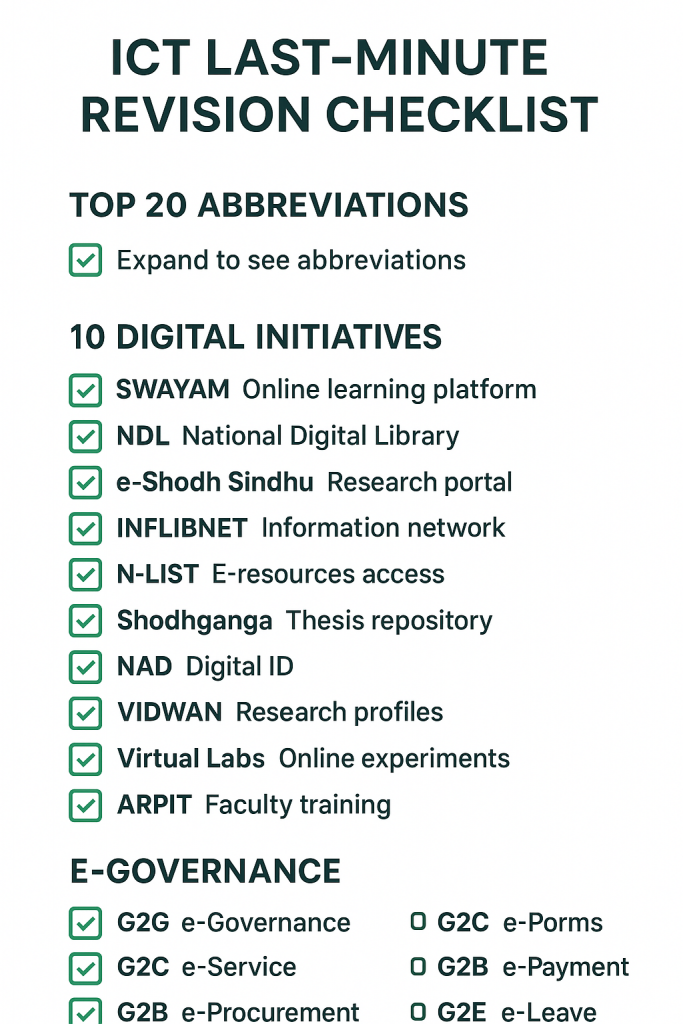
15 Digital Initiatives with Key Facts
SWAYAM: Study Webs of Active-Learning for Young Aspiring Minds; 4 quadrants; 7 national coordinators; free courses with paid certification. SWAYAM Prabha: 40 DTH educational channels; GSAT-15 satellite; managed by BISAG Gandhinagar. NDL India: National Digital Library; 72 lakh+ resources; managed by IIT Kharagpur. e-Shodh Sindhu:Merged consortium; 15,000+ e-journals; managed by INFLIBNET.
INFLIBNET: Information and Library Network Centre; autonomous UGC centre; manages multiple digital library services. N-LIST: National Library services for colleges; 6,000+ e-journals access. NAD: National Academic Depository; digital certificates storage. VIDWAN: Expert database; researcher profiles; managed by INFLIBNET.
Virtual Labs: Remote laboratory experiments; 205+ labs; 1,515 experiments. e-PG Pathshala: Postgraduate e-content; 70 subjects; 23,000+ modules. ARPIT: Annual Refresher Programme in Teaching; faculty development through SWAYAM. GIAN: Global Initiative of Academic Networks; international faculty engagement.
NPTEL: National Programme on Technology Enhanced Learning; IIT Madras; engineering courses. Shodhganga:Thesis repository; completed PhDs. Shodh Gangotri: Research synopsis repository; ongoing PhDs.
e-Governance Models Quick Recall
G2G (Government to Government): e-Office file management, digital signatures, inter-departmental communication, NIC networks.
G2C (Government to Citizen): DigiLocker (digital documents), Passport Seva, PAN services, Common Service Centres, e-District services, IRCTC, National Agriculture Market (eNAM).
G2B (Government to Business): MCA21 (company registration), GeM (Government e-Marketplace), GST portal, e-procurement, e-tender systems.
G2E (Government to Employee): EPFO (provident fund), Pradhan Mantri Rojgar Protsahan Yojana, e-Attendance systems.
Digital India Nine Pillars: Broadband Highways, Universal Mobile Access, Public Internet Access, e-Governance, e-Kranti, Information for All, Electronics Manufacturing, IT for Jobs, Early Harvest Programmes.
Conclusion
The ICT section of UGC NET Paper 1 offers a high return on investment for aspirants willing to dedicate focused effort to preparation. With 5-6 questions contributing 10-12 marks, mastering this unit can significantly boost your overall Paper 1 score. The key is strategic preparation that prioritizes high-weightage topics like digital initiatives while ensuring coverage of abbreviations and e-governance concepts.
Your revision strategy should allocate approximately 40% of ICT study time to Digital Initiatives (SWAYAM ecosystem, digital libraries, teacher training platforms), 25% to abbreviations and terminology, 20% to Internet and communication technologies, and 15% to e-Governance models. Regular practice with previous year questions will familiarize you with exam patterns and build confidence. Remember that most ICT questions test recognition and recall rather than analytical skills, so systematic memorization using the techniques discussed in this guide will serve you well on exam day.
Frequently Asked Questions on UGC NET Paper 1 ICT
Is UGC NET Paper 1 ICT syllabus same for all subjects?
Yes, the ICT syllabus is identical for all candidates regardless of their Paper 2 subject. Unit 8 (ICT) is part of Paper 1, which is common for all subjects. Whether you’re appearing for Law, Commerce, English, or any other subject, you’ll face the same ICT questions in Paper 1.
Are questions on software types (freeware, shareware, etc.) asked in UGC NET Paper 1 ICT?
Yes, these are frequently tested in definition or statement-based questions. Key distinctions: Freeware is free to use but closed-source; Shareware offers a trial period before payment; Open Source allows modification and redistribution of code; Proprietary requires a paid license with restricted access. Practice matching their characteristics from previous years.
How many ICT questions appear in UGC NET Paper 1?
Based on analysis of previous year papers, UGC NET Paper 1 typically includes 5-6 questions from the ICT unit, worth 10-12 marks. This number has remained consistent across exam cycles. While the exact distribution varies between shifts, you can reliably expect at least 5 questions from Unit 8 in your exam.
Are questions on MS Office applications asked in UGC NET Paper 1 ICT?
MS Office features are frequently tested in UGC NET Paper 1 ICT matching questions. For instance, Mail Merge (Microsoft Word), Pivot Table (Microsoft Excel), Slide Master (Microsoft PowerPoint), and Macros (primarily Word/Excel for automation). Memorize these pairings for quick scoring in application-based terminology questions.
Which topics within ICT are most important for the exam?
Digital Initiatives in Higher Education is the most important sub-topic, contributing approximately 40-45% of all ICT questions. Within this, SWAYAM and its components appear most frequently. Abbreviations and terminology rank second in importance, followed by e-Governance concepts and Internet fundamentals.
Is it necessary to memorize all ICT abbreviations?
You don’t need to memorize every abbreviation, but you should know the high-frequency terms that appear repeatedly in exams. Focus on approximately 50-60 core abbreviations covering computer components, networking, protocols, file formats, and email terms. The abbreviations listed in this guide represent the essential set for exam preparation.
What is the difference between SWAYAM and NPTEL?
SWAYAM is the umbrella MOOCs platform that hosts courses across all educational levels from Class 9 to postgraduate. NPTEL is one of the seven national coordinators of SWAYAM, specifically responsible for engineering courses, and is managed by IIT Madras. All NPTEL courses are available on the SWAYAM platform, but SWAYAM also includes courses from UGC, CEC, NCERT, NIOS, IGNOU, and IIM Bangalore.
How should I prepare digital initiatives for quick recall?
Create a structured table or mind map organizing initiatives by category: content delivery platforms (SWAYAM, SWAYAM Prabha), digital libraries (NDL, e-Shodh Sindhu, INFLIBNET), academic services (NAD, VIDWAN), and teacher training (ARPIT, GIAN). Associate each initiative with one or two key facts: SWAYAM has 4 quadrants and 7 coordinators, SWAYAM Prabha has 40 channels, NDL has 125 million resources.
Are questions on e-governance important for UGC NET Paper 1 ICT?
Yes, e-governance questions have increased in recent exam cycles. You should know the four pillars (G2G, G2C, G2B, G2E) and be able to identify which platforms fall under each category. Questions about DigiLocker, GeM portal, and Digital India’s nine pillars appear with moderate frequency.
What types of cybersecurity questions appear in the exam?
Cybersecurity questions typically focus on types of malware (virus, worm, trojan, ransomware), social engineering attacks (phishing), and basic security measures (firewalls, encryption). In the June 2025 UGC NET Paper 1 exam, a question appeared asking candidates to identify characteristics of malware. Know the basic definitions and distinguishing features of different cyber threats.
What books should I refer to for ICT preparation?
Standard UGC NET Paper 1 preparation books by publishers like Trueman’s, Arihant, and GK Publications cover ICT adequately. For deeper understanding, you can refer to NCERT Computer Science textbooks. However, online resources, YouTube videos, and previous year questions are often more effective for ICT preparation than books.
How much time should I dedicate to ICT revision?
For comprehensive ICT preparation, 15-20 hours spread over 2-3 weeks is sufficient for most candidates. If you have a technical background, you may need less time. Allocate time proportionally: 6-8 hours for digital initiatives, 4-5 hours for abbreviations, 3-4 hours for Internet concepts, and 2-3 hours for e-governance.
Do questions on computer hardware still appear in exams?
Yes, basic computer hardware questions still appear, typically 1-2 per exam. These focus on abbreviations (CPU, RAM, ROM, ALU) and basic concepts like volatile vs. non-volatile memory. You don’t need deep technical knowledge; understanding what each component does at a conceptual level is sufficient.
What is the best way to revise ICT in the last week before an exam?
In the final week, focus on rapid recall rather than learning new content. Review the abbreviation list daily using flashcards or self-testing. Go through the digital initiatives table, ensuring you can match each initiative with its key features. Practice 2-3 previous year papers specifically focusing on ICT questions. Use the last-minute revision checklist in this guide.
Are there any recent additions to the ICT syllabus?
The core syllabus has remained stable, but recent exams show increased emphasis on cybersecurity concepts, emerging technologies (IoT, AI), and newer digital initiatives. Stay updated on new government digital platforms and any additions to the SWAYAM ecosystem. Reading technology news occasionally helps you stay prepared for contemporary questions.
How to score full marks in ICT section of UGC NET Paper 1?
To score full marks: (1) Master the 50-60 essential abbreviations through daily practice, (2) Create a comprehensive digital initiatives chart with key facts, (3) Understand the four e-governance pillars with examples, (4) Practice all available previous year ICT questions, (5) Focus on matching-type and statement-based question formats. Given the factual nature of ICT questions, full marks are achievable with systematic preparation.
Related Reading: Data Interpretation UGC NET- https://lawsikho.com/blog/data-interpretation-ugc-net/: , Research Aptitude for UGC NET Paper 1: Essential Concepts Simplified (Unit 2): https://blog.ipleaders.in/research-aptitude-for-ugc-net-paper-1-unit-2/, Teaching Aptitude for UGC NET Paper 1: Essential Guide for Unit 1 Preparation:



 Allow notifications
