
A practical guide for Indian litigators, law firm lawyers, and in-house counsels.
Most lawyers in India think they are “using AI” because they opened ChatGPT and asked it to draft a legal notice.
Table of Contents
That is not using AI. That is chatting with a chatbot.
The output can belong to any lawyer, in any jurisdiction, in any practice area on earth. It has no knowledge of your client, your court, your judge’s preferences, the opposing counsel’s patterns, or the specific section of the BNS you need to argue under. It starts from zero every single time.
And here is the part that nobody tells you:
In a chat window, you cannot go beyond level 1. The tool itself is the ceiling.
There are five levels of AI adoption in legal practice. Understanding which level you are at is the fastest way to figure out what to do next and what is actually possible for your practice today.
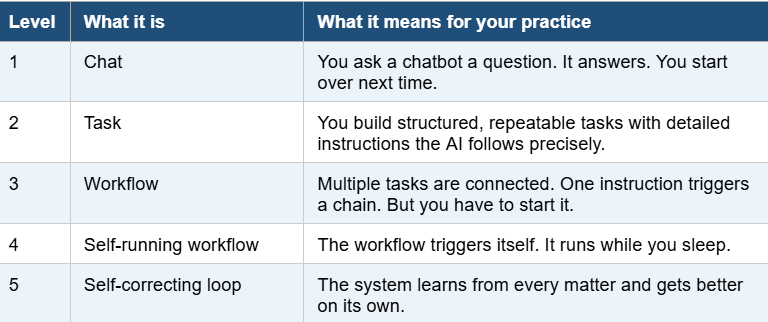
Let me walk you through each level with real examples from the kind of work Indian lawyers actually do.
Level 1: Chatbots in AI for Law
This is where 90 percent of Indian lawyers who “use AI” are operating right now.
You open ChatGPT or Claude. You type something like: “Draft a bail application under Section 483 of BNSS for anticipatory bail in a cheating case.” You get something back. It reads like a legal document. The language sounds right. But look closely.
The output does not know which High Court you are filing in. It does not reference the specific grounds for apprehension of arrest in your client’s case. It does not cite the latest division bench judgment from your court on the conditions typically imposed. It might cite cases that do not exist. It might apply a section that was renumbered under the new criminal laws.
What this looks like in practice
A trial litigator in Lucknow opens ChatGPT to draft a reply to a Section 138 NI Act notice. The output is generic. It misses the specific date calculation for the 15-day reply window based on when the notice was actually received by the client.The litigator spends 45 minutes fixing something that should have saved time.
An associate at a law firm asks Claude to summarise a 200-page share purchase agreement. The summary is decent but misses the non-standard indemnity basket structure that is the single most commercially important clause in the deal.
An in-house counsel asks ChatGPT to draft a vendor NDA. The output uses Delaware governing law. The company is in Bengaluru.
The fundamental problem is not that the AI is stupid. It is that you are giving it nothing to work with. A single line of instruction produces one dimension of output.
You cannot build a practice at this level. You cannot scale. Every session starts from scratch. You are briefing a stranger every time, and that stranger has never seen the inside of an Indian courtroom.
Worse, staying here is actively dangerous. Hallucinated case citations have already led to courts across the world censuring lawyers. The Supreme Court of India has been clear that the responsibility for accuracy falls entirely on the advocate.
Level 2: Task Automation with AI for Lawyers
Level 2 is where you move from having a conversation with AI to making AI execute a defined job.
Instead of typing a one-line question, you build a detailed, structured set of instructions for a specific legal task. This is sometimes called a “skill” or a “prompt template.” A good one is 500 to 1,000 lines long. It contains your framework, your red flags, your checklists, your formatting preferences, and examples of what strong output looks like.
What the agents look like at this level
A research agent: you give it the facts of your case and the legal issue. It does not just search. It applies your preferred research methodology. It checks for recent amendments. It separates High Court decisions from Supreme Court decisions. It flags conflicting judgments. It identifies the strongest authorities for your jurisdiction and court.
A drafting agent: you give it the research output and your firm’s standard format. It drafts using your clause structures, your risk disclosures, your preferred language. Not generic legal English. Your English.
A review agent: it reads the drafted document and flags internal inconsistencies, missing definitions, undefined terms, clauses that conflict with each other, and provisions that have been superseded by recent amendments.
A formatting agent: it takes the reviewed document and applies your court’s prescribed format, paragraph numbering convention, citation style, margin requirements, and filing specifications. No more wasting 30 minutes fixing formatting before every filing.
Real examples
A litigation partner builds a bail application drafting task. The instructions include: always cite the three-part test from Sushila Aggarwal, always address the specific apprehension of arrest, always include a personal bond and surety structure that matches local practice, always format per the High Court’s filing guidelines. The output is ready for court after a five-minute review instead of an hour of editing.
A corporate associate builds a due diligence task for Section 8 company compliance. The template includes every statutory register, every ROC filing, every board resolution that needs to be checked. Instead of spending two days on a DD exercise, it takes three hours.
An in-house counsel builds a contract review task that checks every vendor agreement against 47 specific risk points the company cares about: limitation of liability caps, IP assignment language, data processing terms under the DPDP Act, indemnity triggers, and auto-renewal traps. Every contract goes through the same rigorous review instead of whatever the reviewer remembers to check that day.
The quality difference between level 1 and level 2 is enormous. But there is a ceiling here too. You are still the engine. Every time you want to run a task, you open it, paste your inputs, execute it, and review the output. You cannot step away from the keyboard. Your ceiling is your billable hours.
Level 3: Workflow Automation in Legal Practice
This is where AI stops being a tool and starts being a system.
A workflow is a set of interconnected tasks where the output of one feeds directly into the input of the next. You do not copy and paste between steps. You do not re-brief the AI at each stage. One instruction triggers the entire chain.
What this looks like in practice
You receive a new brief for an arbitration matter. You switch on your workflow. The research agent reads the facts from your brief, identifies the applicable legal issues, pulls relevant arbitral awards and High Court decisions under the Arbitration and Conciliation Act, and structures the five strongest arguments. That output feeds automatically into your drafting agent, which writes the statement of claim in your firm’s house style with your preferred clause-by-clause structure. The review agent then runs through the draft, flags every factual assertion that is not supported by a cited document, checks every section reference against the current statute, and highlights anything that might draw an objection from the tribunal. You sit down to a near-final draft that has been through three rounds of processing without you touching it.
A law firm handling M&A transactions builds a due diligence workflow. When a new transaction starts, the workflow pulls the target company’s MCA filings, checks statutory compliance across labour, tax, environment, and FEMA, maps the shareholding structure, identifies red flags in the board resolutions, and produces a colour-coded DD report. What used to take a team of four associates two weeks now takes one associate two days of focused review.
An in-house counsel builds a contract lifecycle workflow. When a new vendor agreement arrives, the extraction agent pulls the key commercial terms. The analysis agent checks them against the company’s approved risk matrix. The drafting agent marks up the agreement with suggested redlines. The summary agent produces a one-page executive brief for the business team. The in-house counsel reviews the package and approves or sends it back with a single note.
The key difference between level 2 and level 3: at level 2, each step is a separate manual action. At level 3, the steps are connected and one instruction runs the whole chain.
But there is an important caveat. The workflow only runs when you switch it on. If a new matter arrives and you forget to initiate the workflow, nothing happens. The intelligence is there, but the trigger is still you.
Tools that make this possible today
Claude Code lets you build multi-step workflows where agents hand off to each other programmatically. You define the steps, the handoff points, and the quality checks. It runs locally on your machine. Your client data never leaves your computer.
Cowork by Anthropic takes Claude off the chat window and onto your desktop. It can read your files, open applications, process documents, and execute multi-step tasks autonomously. It has a dedicated legal plugin that understands contract review, NDA triage, and compliance workflows. It connects to Slack, Microsoft 365, and document management systems your team already uses.
Google Antigravity is a development environment where AI agents can plan, write, execute, and test code with a built-in browser. You can pair it with free local LLMs running on your machine through Ollama or LM Studio, so the AI runs entirely offline and costs you nothing beyond the initial setup. This matters enormously for lawyers handling sensitive client information who cannot send documents to cloud servers.
Level 4: Self-Running Workflow
This is where the system stops waiting for you.
At level 3, you press the button. At level 4, the button presses itself. You automate the trigger so the workflow starts without your involvement. It runs while you are sleeping, in court, or meeting a client.
What this looks like in practice
A litigation practice sets up a trigger on the eCourts API. Every evening, the system checks the cause list for the next day. If any of your matters are listed, the workflow pulls the case file, reviews the last order, identifies what was directed by the court, checks whether compliance has been done, and prepares a one-page status brief for each matter. When you check your phone at 7 AM, the briefs are waiting.
A law firm connects the workflow to its email. When a client sends a contract for review, the system detects the attachment, triggers the contract review workflow, and by the time the associate opens the email two hours later, the first-pass review is sitting in a shared folder with flagged issues, risk scores, and suggested redlines. The associate’s job is to apply judgment to the output, not produce it from scratch.
An in-house counsel automates compliance deadline monitoring. When a regulatory filing deadline approaches, the system pulls the relevant data, prepares the draft filing, flags anything that needs human sign-off, and routes it to the right approver. If the approver does not act within 48 hours, it escalates.
Beyond documents: what else becomes possible
Voice agents that answer your office phone when you are in court. The AI takes the call, asks structured intake questions, captures the caller’s name, issue, and urgency, records a summary, and sends you a brief on WhatsApp. No missed clients. No playing phone tag between hearings.
AI avatars for initial client consultations. A potential client visits your website, interacts with your AI avatar that understands your practice areas, answers preliminary questions about process, timelines, and documentation required, and books a consultation with you if the matter falls within your expertise. Your intake pipeline works 24 hours a day.
Journalist outreach automation. Your system monitors regulatory changes, new judgments, and legislative developments in your practice area. When something newsworthy happens, it drafts a concise expert commentary and sends it to journalists who cover your beat. You build visibility as a subject matter expert without spending an hour writing op-eds. The journalists get timely, accurate insights. Both sides win.
Client update automation. After every hearing, the system reads your notes (even handwritten ones if you photograph them), drafts a client update email in your style, and queues it for your review. One tap to send. No more clients calling because they have not heard from you in three weeks.
Level 5: Self-Correcting Loop
Almost no lawyers are here yet. This is the endgame, and it is the reason the lawyers who start building now will be impossible to catch later.
The difference between level 4 and level 5 is that the system does not just run automatically. It gets better automatically.
What this looks like
Your research agent has processed 400 matters over the past year. It now knows that in your district court, Section 138 NI Act complaints with a specific fact pattern tend to result in conviction when three particular evidentiary elements are present. It prioritises those elements in its research output for new matters.
Your drafting agent has been through 200 rounds of your feedback. It knows which phrases you always strike out, which clause structures you always prefer, which risk disclosures you always add. Its first drafts now look like your fifth drafts used to.
Your contract review agent has processed 600 vendor agreements for your company. It knows which clauses the procurement team always pushes back on, which terms the finance team always flags, which provisions have historically led to disputes. It prioritises these in every new review.
Your litigation workflow has tracked outcomes across 150 bail applications. It knows which arguments worked with which judges, which conditions were typically imposed, which surety structures were accepted. When a new matter comes in, it does not start from a blank template. It starts from your firm’s accumulated experience.
Every matter makes the system smarter. Every correction you make gets absorbed. Every outcome gets logged. You are not just automating your practice. You are building an institutional asset that compounds over time.
And here is the part that matters most.
The loop never stops
It improves every single day
It is not a one-time setup that you configure and forget. It is a living system that gets better continuously. When you read a new judgment and refine your understanding of how a particular bench interprets a provision, that refinement flows into your agents. When you win an argument using a novel framing, the system absorbs that framing and applies it to the next similar matter. When you lose and understand why, that lesson gets encoded too.
Your growth feeds the system’s growth
The quality of the automated output constantly increases because the quality of your own judgment is constantly increasing. The better you get at practising law, the better every automated output becomes. The two compound together.
The burden lifts
You are no longer carrying the weight of every document, every deadline, every follow-up, every piece of research on your own shoulders. The heavy, grinding, repetitive burden that makes so many lawyers burn out and lose their love for the profession lifts. You are free to focus on what actually makes you a better lawyer: learning, thinking, advising, appearing in court, and building relationships with clients, growing your practice, scaling, mentoring juniors, and yes, having a life outside of work.
You can actually enjoy practising law again
Not because the work has become easier, but because you are finally doing the parts of it that made you want to become a lawyer in the first place. The free time you gain is not idle time. It is time for learning, growth, and scaling without feeling like you are carrying the weight of the world.
This is the dream law firm
A firm where every associate’s work product reflects the judgment of the most experienced partner, because that judgment has been encoded into the system that produces the first draft. A firm where the system gets better every day, not because someone is manually updating templates, but because the loop is running, learning, and refining itself with every matter it touches.
Why Most Lawyers Are Stuck at Level 1
If you are using ChatGPT or any chatbot for legal work and wondering why the output feels mediocre, this is your answer: the tool is structurally limited to level 1. No amount of clever prompting inside a chat window will give you connected workflows, automated triggers, or learning loops. You need different tools entirely.
AI-generated legal documents that are not grounded in your practice, your jurisdiction, and your clients produce a 40 to 60 percent rework rate. You get an output that looks finished but is not. You end up doing the work of an associate instead of reviewing like a partner.
The gap between levels 1 and 2 versus levels 3 to 5 is not intelligence. It is architecture. Lawyers at levels 1 and 2 are generating volume. Lawyers at levels 3 to 5 are generating volume that reflects their actual practice, because their judgment has been built into the system.
The Dream Law Firm is Now Possible To build
Five years ago, everything described in levels 3 to 5 would have required a software development team, a six-figure technology budget, and months of implementation. Today, a solo practitioner can build it.
Claude Code gives you the ability to build multi-agent workflows where a research agent, a drafting agent, a review agent, and a formatting agent work together on your matters. It runs on your laptop. Your data stays local.
Cowork brings the same agentic power to non-technical lawyers through a visual interface. Its legal plugin handles contract review, compliance tracking, and document analysis out of the box, and connects to the tools you already use.
Google Antigravity lets you run AI agents with a built-in browser, so your agents can check eCourts, pull MCA filings, monitor regulatory websites, and interact with any web-based system your practice depends on.
Free local LLMs through Ollama or LM Studio mean you can run AI on your own machine with zero ongoing cost. Pair that with Antigravity’s browser agent and you have a system that monitors, researches, drafts, and files without sending a single byte of client data to anyone’s server.
Voice bots handle your phone when you are in court. AI avatars handle initial consultations on your website. Automated journalist outreach builds your public profile while you sleep.
This is no longer theoretical. Every tool mentioned here exists today and is either free or costs less than a junior associate’s monthly salary.
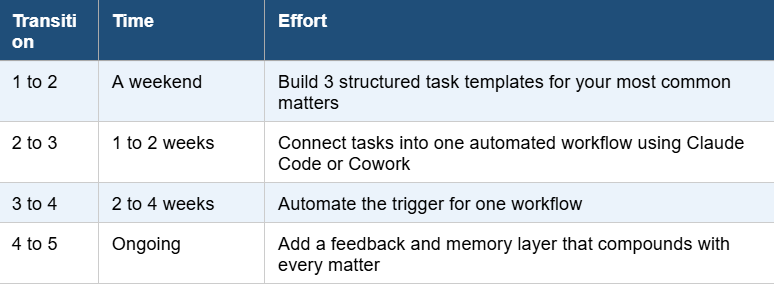
Your first moves at each level
Level 1 to 2
Pick your three most common tasks. For a litigator: bail application, written statement, reply to legal notice. For a corporate lawyer: DD checklist, board resolution, shareholder agreement review. For in-house: NDA review, vendor agreement analysis, compliance memo. Build a 500-line structured template for each one that includes your specific framework, your red flags, your preferred format, and examples of strong output.
Level 2 to 3
Connect one set of tasks into a workflow. Choose a matter type you handle repeatedly. Map the steps from intake to output. Build an agent for each step. Wire them together so the output of one feeds into the next. For litigators, start with the research-to-draft pipeline. For corporate lawyers, start with the DD workflow. For in-house, start with the contract review cycle.
Level 3 to 4
Automate one trigger. Identify the event that should start your workflow. A new email from a client. A new file in a folder. A calendar date approaching. A change on eCourts. Connect the trigger to the workflow so the system starts itself. Set it up so you wake up to completed first drafts instead of a blank screen.
Level 4 to 5
Add memory. After every matter, log what worked and what did not. Which arguments won. Which clauses survived negotiation. Which drafting patterns required the fewest revisions. Feed this data back into your agents as structured memory. Build the loop that lets the system learn from its own outputs. Every matter should make the next one better.
The Window
Right now, operating at level 3 or above puts you in a fraction of one percent of the Indian legal profession. Most lawyers are at level 1. A few technically sophisticated ones are at level 2.
The lawyers who build the architecture now will have compounding advantages that are genuinely impossible to replicate later. Because the advantage is not just speed. It is six months of accumulated matter data, client patterns, judicial preferences, and institutional knowledge baked into a system that gets better the longer it runs.
A firm starting from scratch in two years cannot buy that. They would have to build from zero while your system is already running on hundreds of matters of accumulated intelligence.
Every week you wait is a week of compounding you do not get back.
The dream law firm is now possible to build. The question is whether you will be the one building it.





 Allow notifications